Product Review
Ocean Novel Review: I Built It So Book Two Stops Falling Apart
What this fantasy series writing studio does, what it costs, its limits, and who should actually buy it, from the person who built it.
- $17 Launch price, one-time
- 12 Rooms in one studio
- 7 Fantasy writing bonuses
- 30 days Works-as-shown guarantee
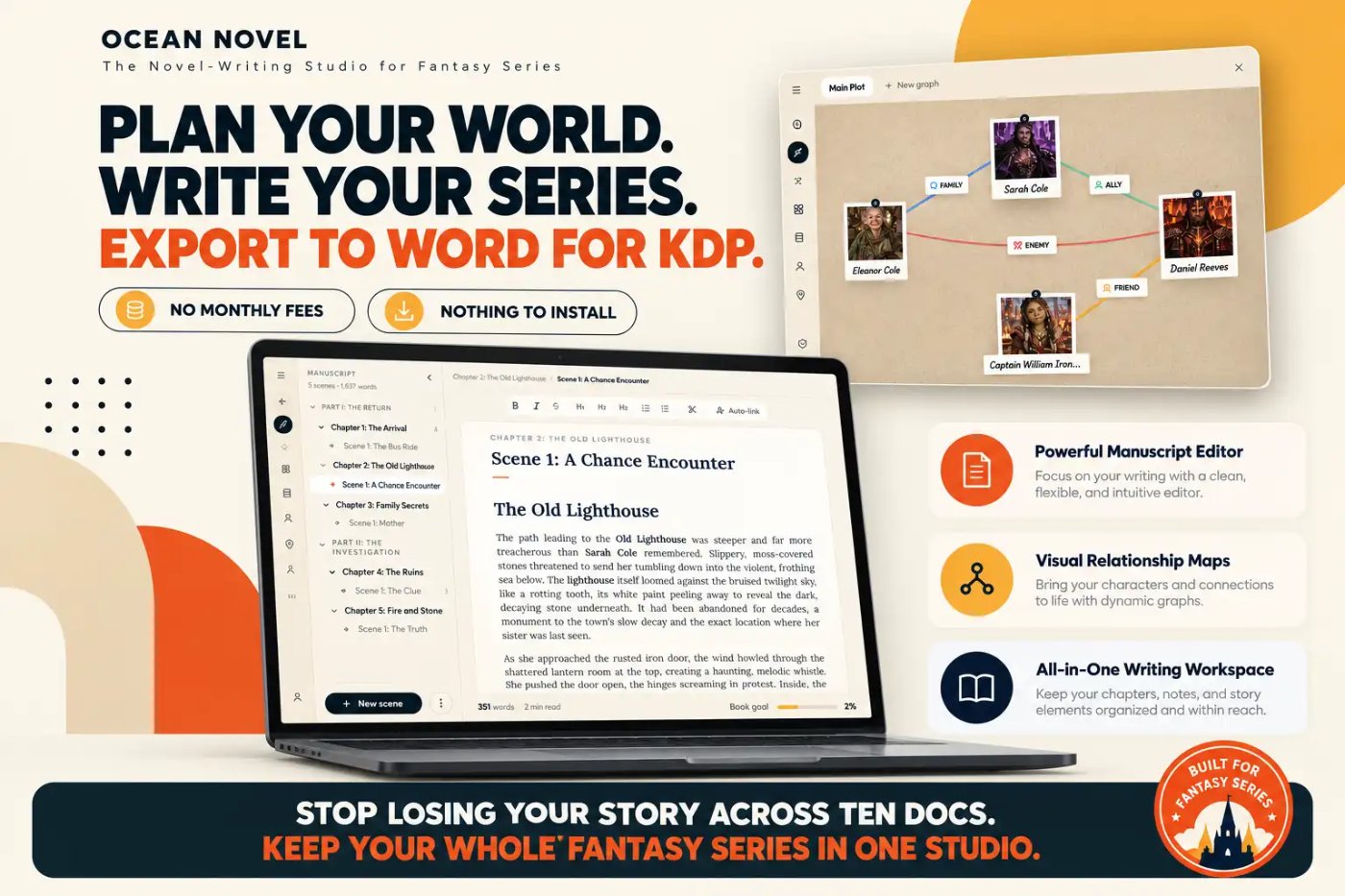
Most unfinished KDP novels do not die from a lack of ideas. They stall because the story lives in ten places at once: a draft in one doc, the cast in a spreadsheet, the map on a sticky note, and chapter 9 in a file called final_FINAL_v3.
Disclosure: I built Ocean Novel. This is my own product and I earn from every sale. I have kept this review to what the tool actually does, including its limits.
That mess is the problem Ocean Novel was built to fix. In this Ocean Novel review I walk through what is inside, what it costs, what it does not do, and who it is really for. It launched on WarriorPlus on 15 October 2026 and is live now.
Short version: Ocean Novel is a browser-based writing studio that keeps a fantasy series' characters, world, plot and manuscript side by side, then exports a Word file you can upload to KDP. It does not write the book for you, and that is on purpose.
See Ocean Novel at the launch price
Ocean Novel at a Glance
| Detail | What you get |
|---|---|
| What it is | A browser-based novel-writing studio for planning, writing and exporting a fiction series |
| Launch date | Launched 15 October 2026 on WarriorPlus (live now) |
| Launch price | $17 one-time during launch, rising to $27 after the launch period |
| Front-End limits | Up to 3 books, 25 characters and 15 locations per book |
| Export | Word (.docx) and plain text |
| Guarantee | 30-day "It Works As Shown" guarantee |
| Best for | KDP publishers writing a fantasy series, or any character-driven fiction series |
What Is Ocean Novel?
Ocean Novel is a writing studio that runs in your browser. Each book gets its own story bible, cast, world atlas, plot map and manuscript, all in one workspace that autosaves and syncs to your account.
It is not an AI writer. The Front-End edition does not generate or rewrite your text. Its job is to hold the facts of your story, such as who has blue eyes, which city is two days north, and what the magic costs, so you can look them up in seconds instead of rereading old chapters.
That matters most in a series. Readers forgive a slow chapter. They rarely forgive a story that contradicts itself between book one and book two.
How It Works
Step 1: Plan
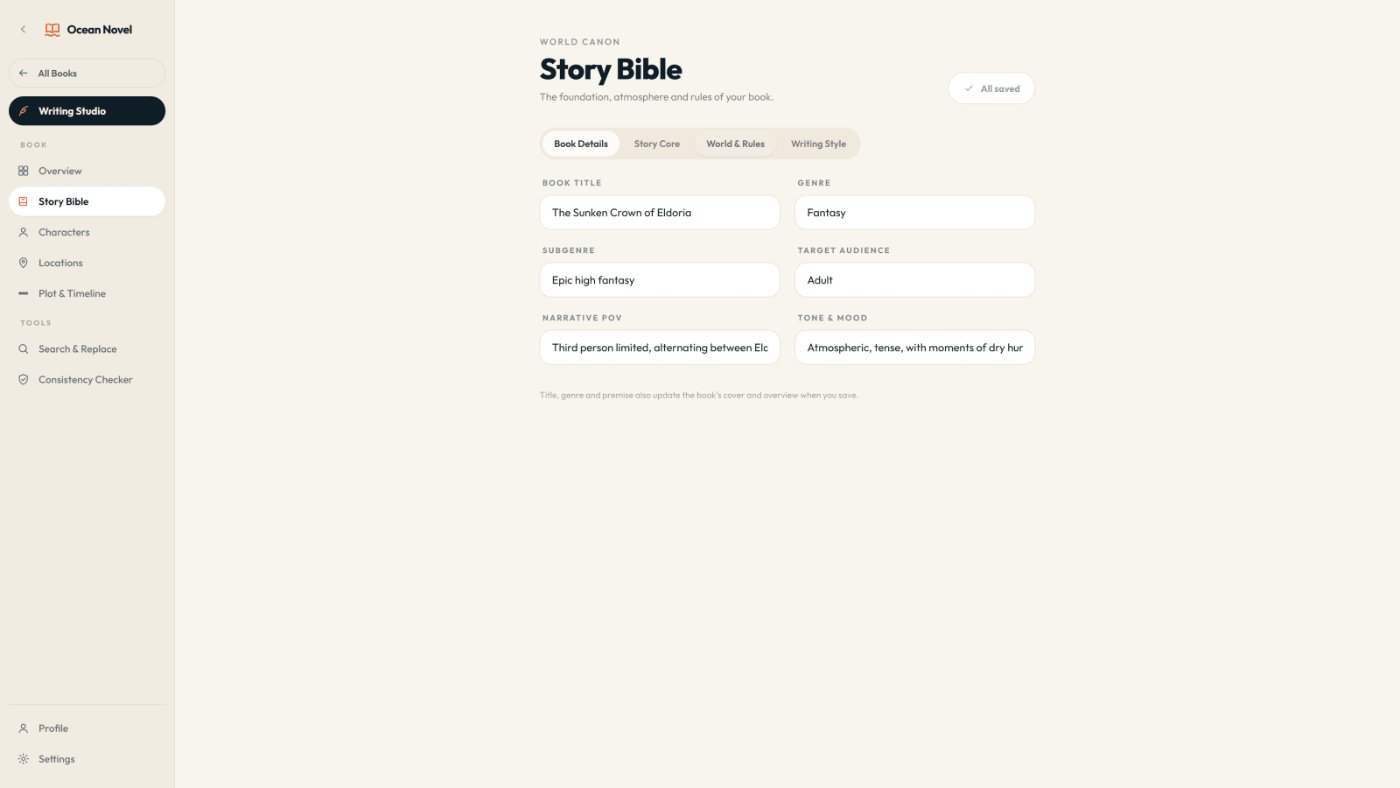
Create a book with its title, pen name, genre and word-count goal. Fill in the Story Bible, add your characters and put every place on the World Atlas.
Step 2: Write
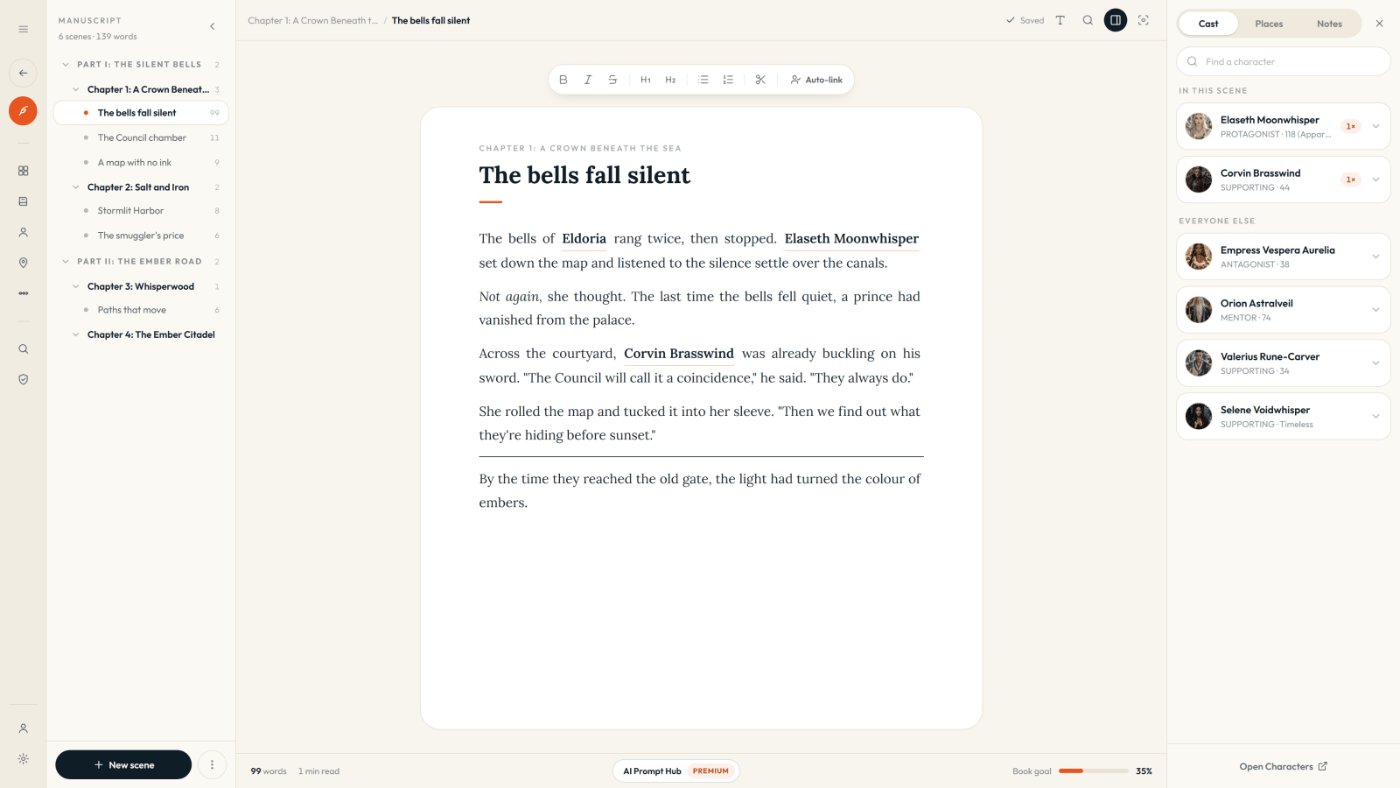
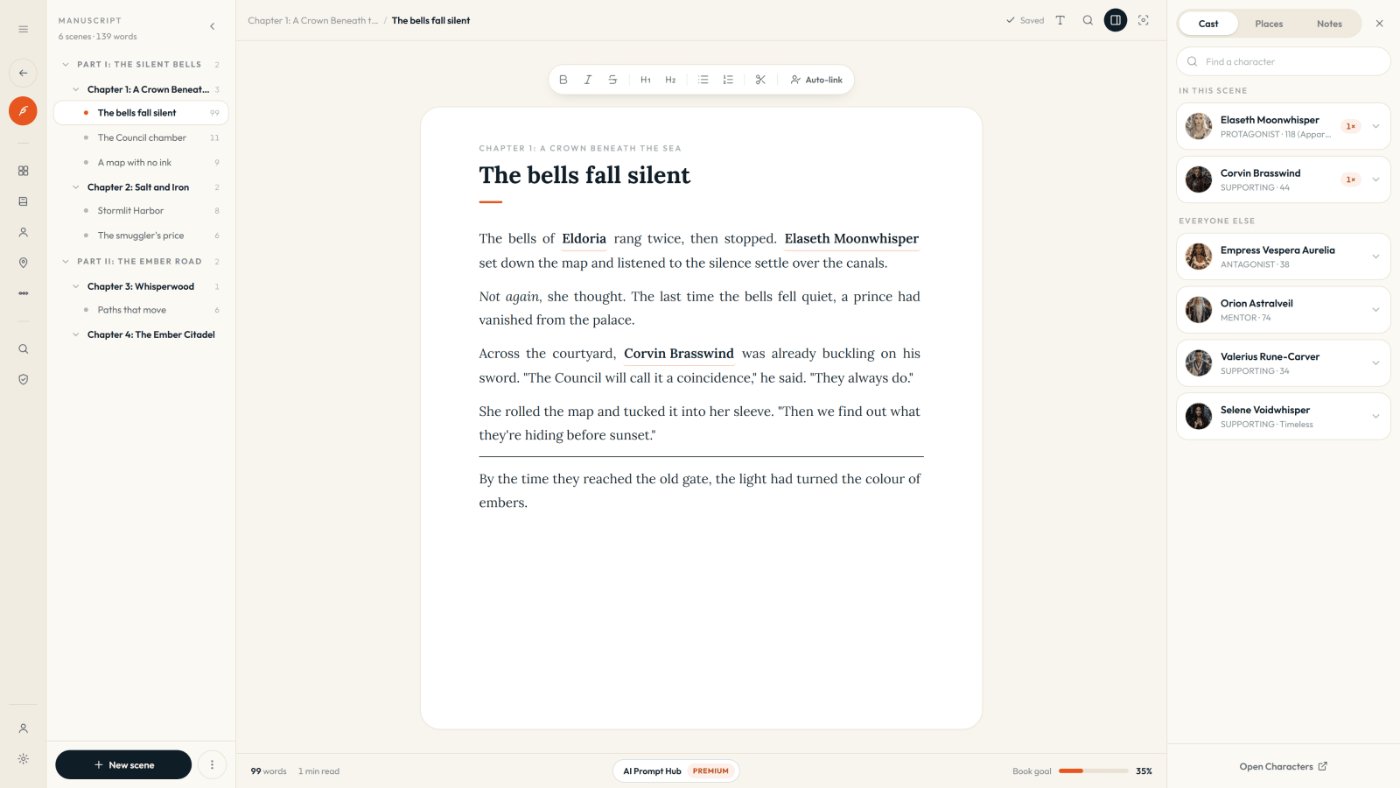
Write scene by scene in a binder of parts, chapters and scenes. Type @ to tag a character or place, and the scene panel shows who is on stage.
Step 3: Export
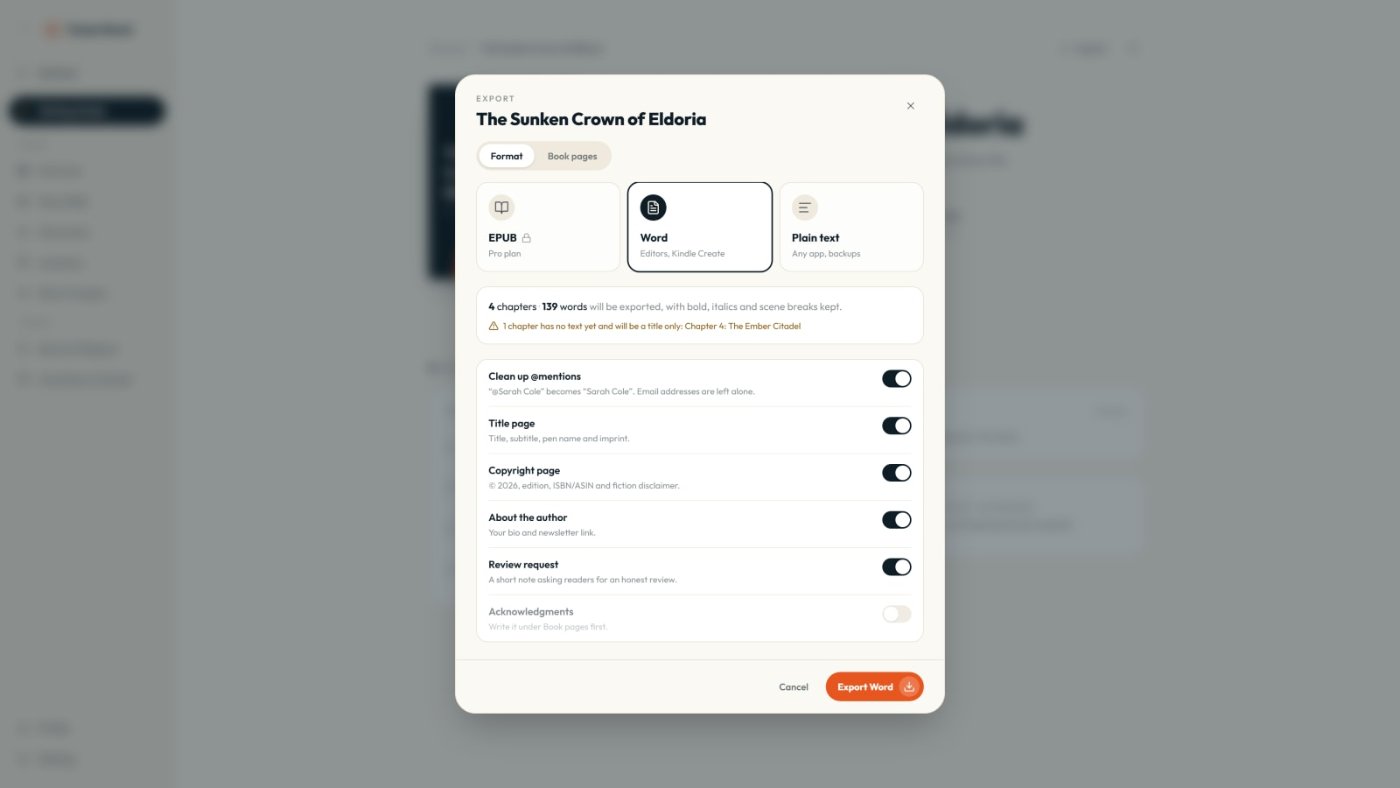
Add your title, copyright and about-the-author pages, then export the whole manuscript to Word with chapters and scene breaks kept.
What Is Inside: The 12 Rooms
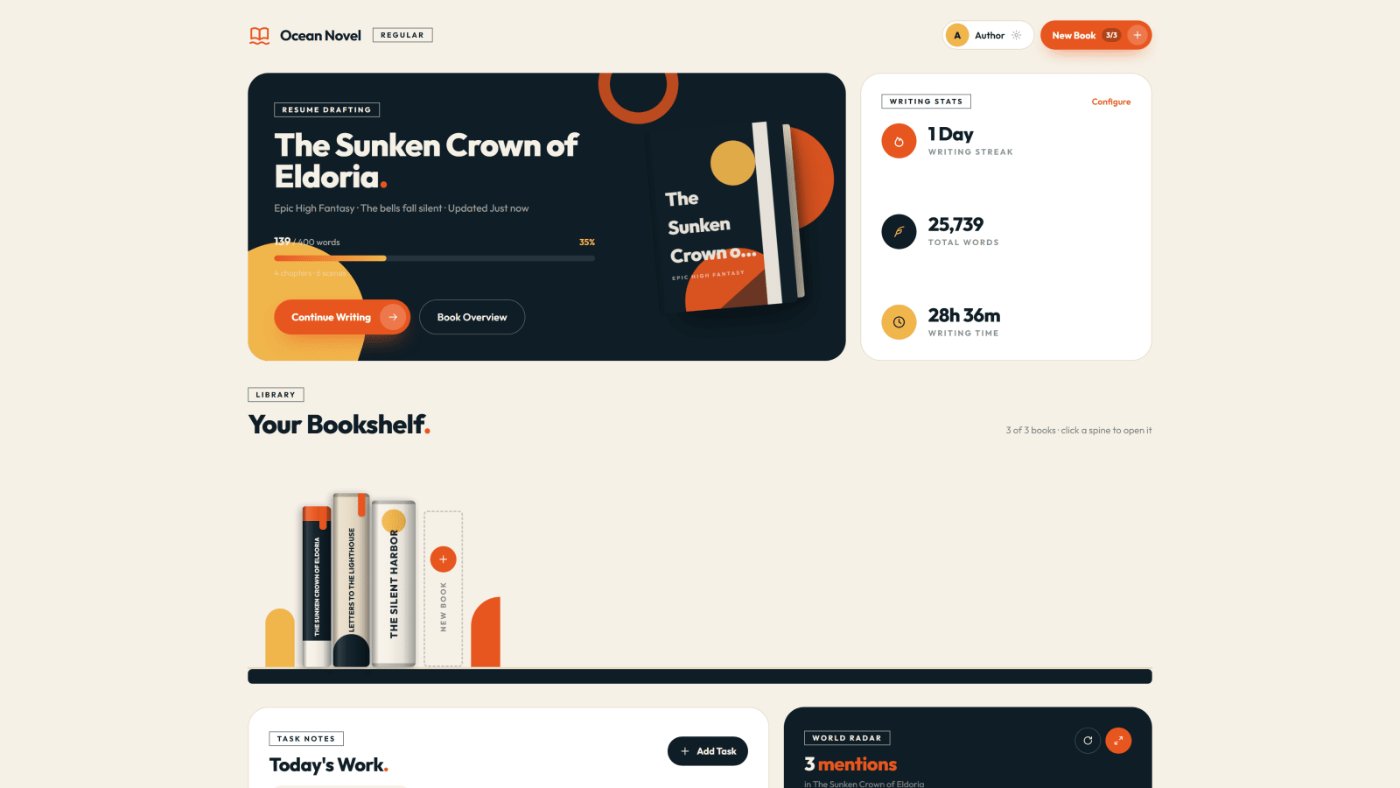
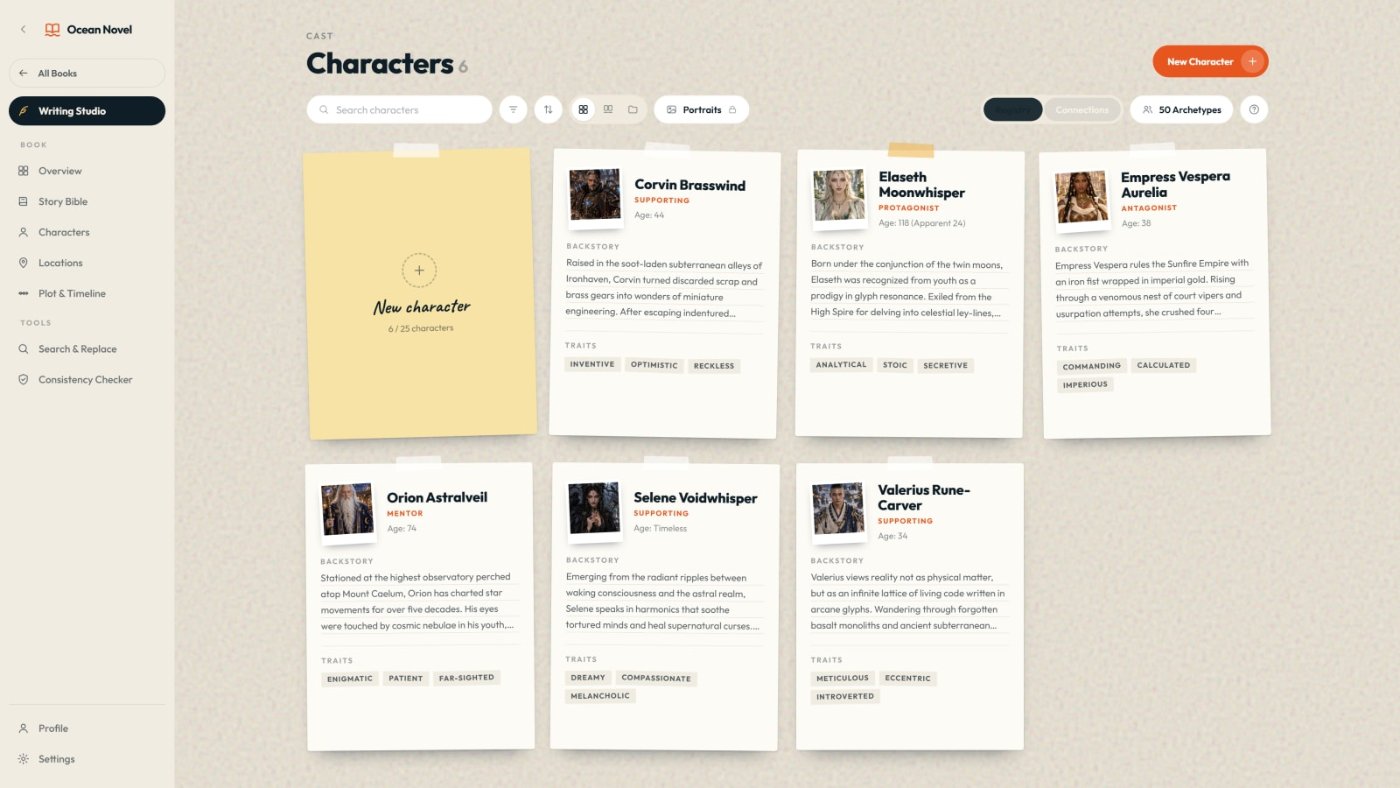
- 01Bookshelf. Up to 3 books, with total words, writing streak, writing time and a "Today's Work" list.
- 02Story Bible. Genre, audience, POV, tone, story core, world rules and a writing-style guide.
- 03Character Board. Portraits from your own images, plus role, goals and flaws. Up to 25 characters per book.
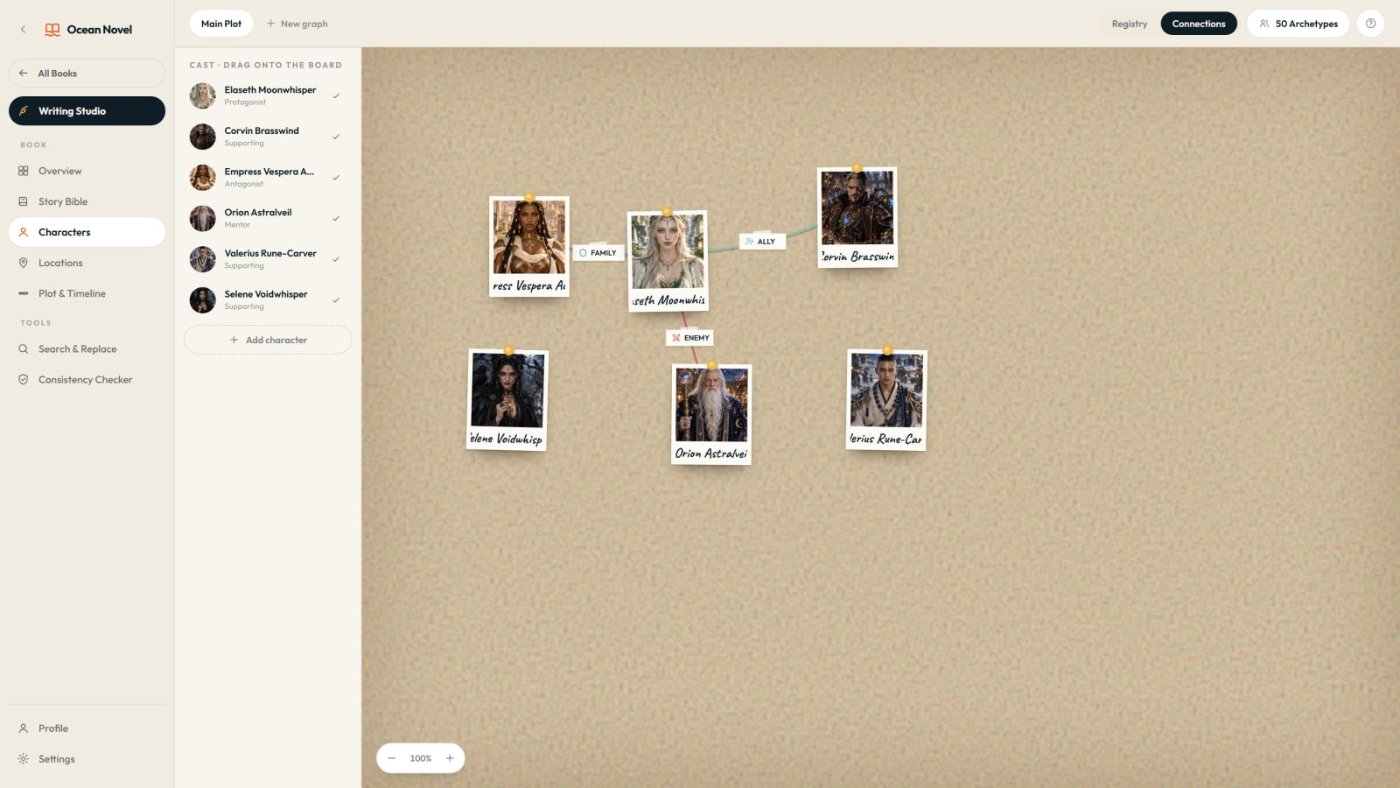
- 04Relationship Map. Family, ally, friend, lover, rival and enemy links on a colour-coded board.
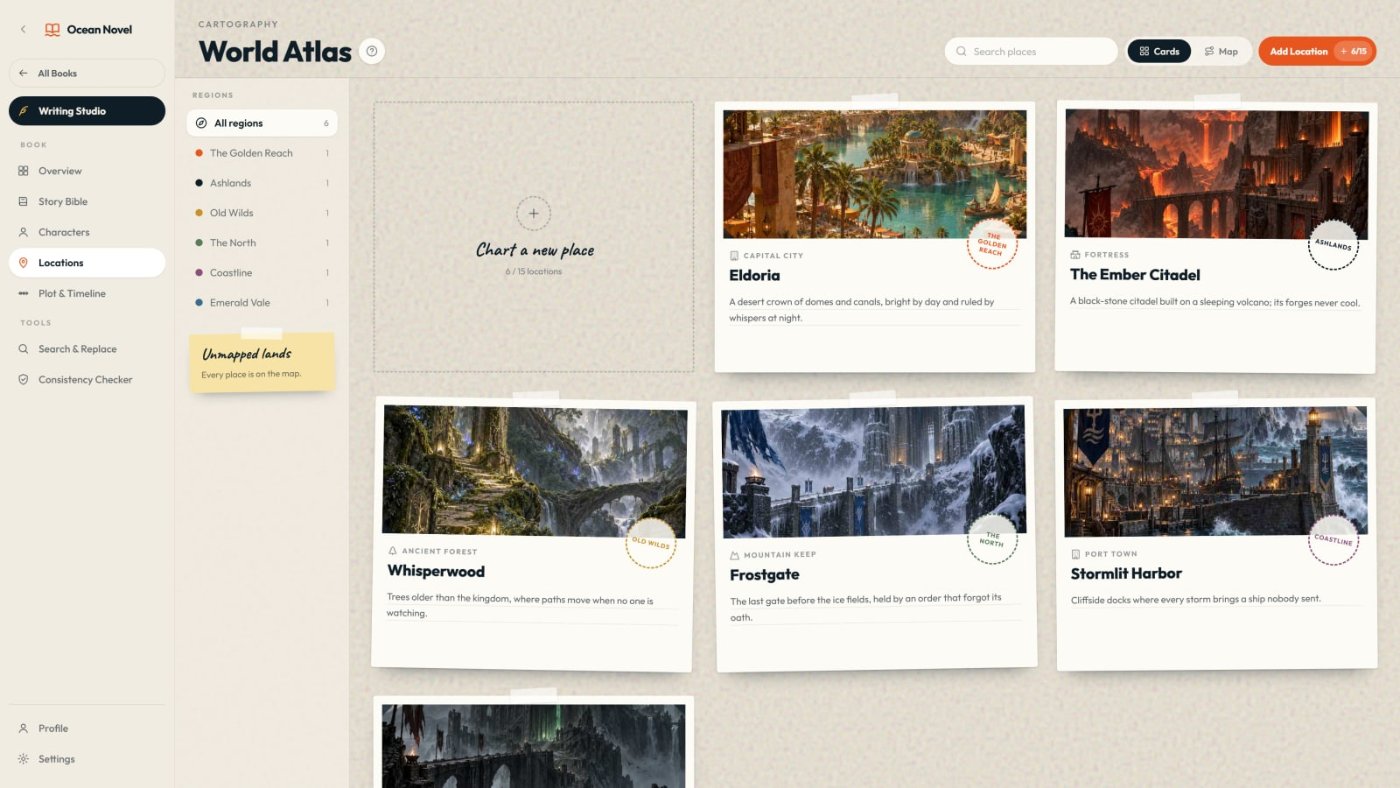
- 05World Atlas. Location cards with images, grouped by region, in card or map view. Up to 15 per book.
- 06Writing Studio. A binder of parts, chapters and scenes with drag and drop, autosave and a book-goal progress bar.
- 07Scene Companion. @mentions, an "in this scene" panel, scene notes and a distraction-free focus mode.
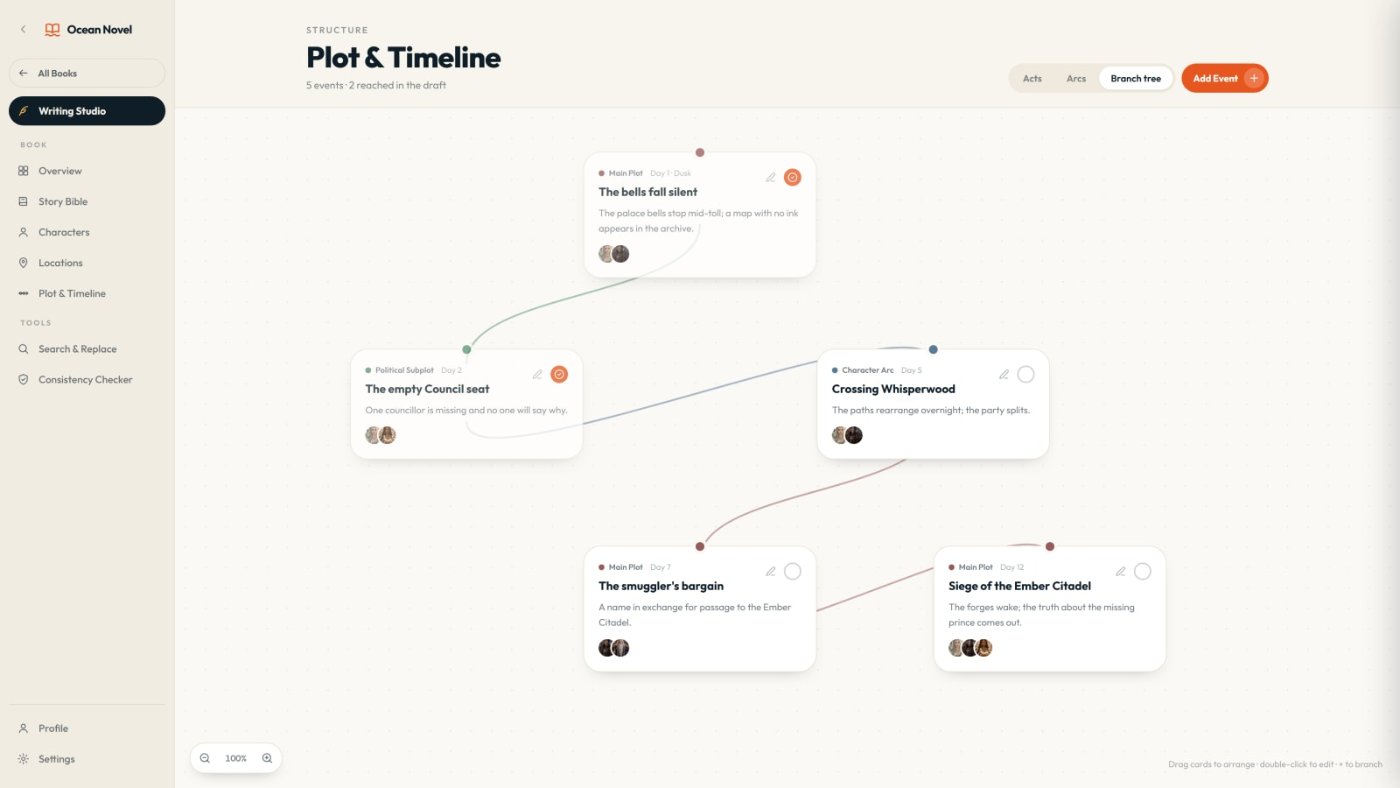
- 08Plot and Timeline. Acts, arcs and a branch tree, with turning points you tick off as the draft reaches them.
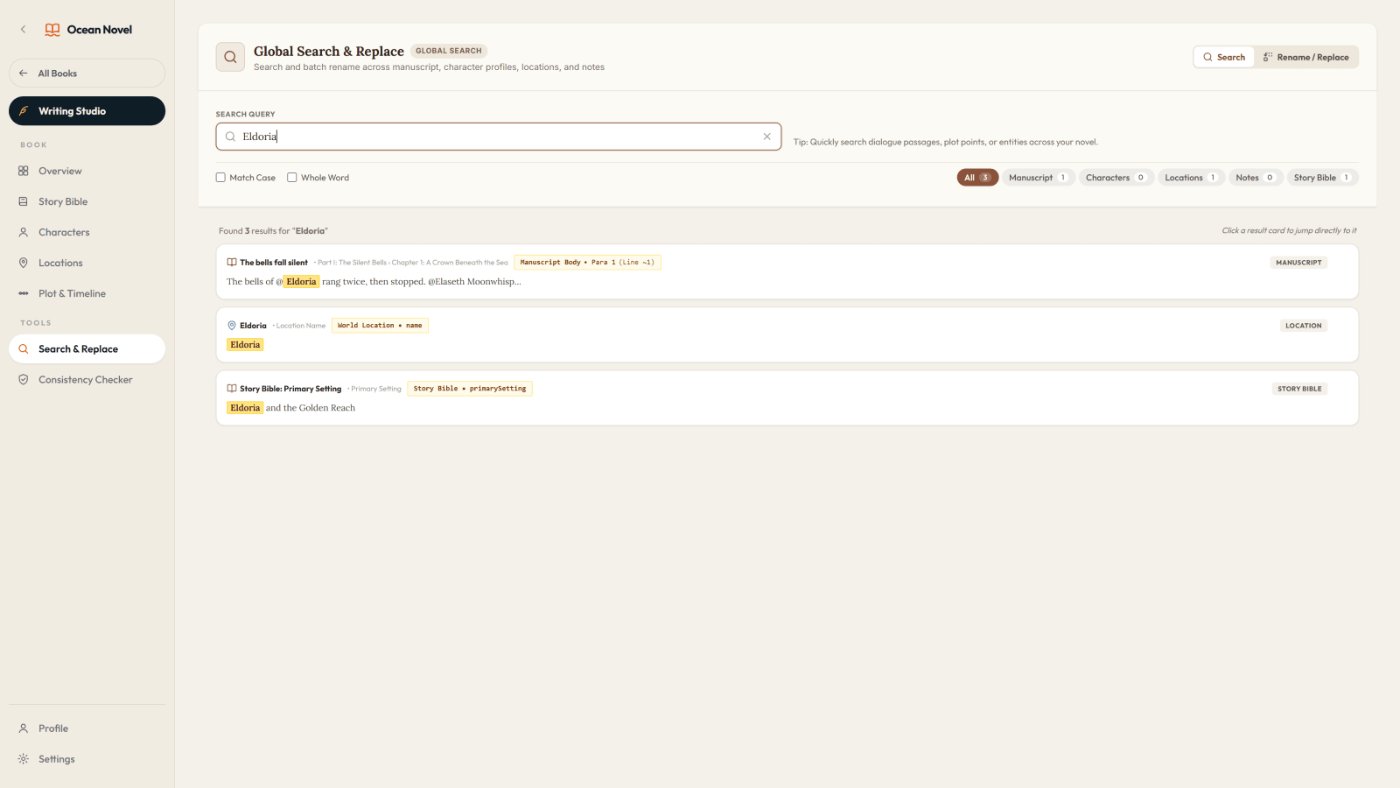
- 09Global Search and Replace. Rename anything across manuscript, characters, places, notes and Story Bible, with preview and undo.
- 10Export and Cloud Sync. Word or plain text export, optional book pages, and @mention tags cleaned out of the text.
- 11World Radar. Mention counts for every character and place, so nobody important disappears for ten chapters.
- 12Book Overview. Every chapter at a glance, what to write next, and how much of your plot the draft has reached.
What Ocean Novel Does Well
- Everything sits next to the manuscript. Your cast, places and rules are one @mention or one click away, not in another tab.
- Renaming is safe. Change a character's name in chapter 20 and it updates everywhere, after you check the preview.
- The middle has a map. Acts, arcs and turning points make it harder for a draft to wander around chapter 12.
- A real finish line. One Word export with front and back pages, instead of stitching forty chapter files together.
- Nothing to install, nothing monthly. It runs in the browser, autosaves, and you can download a one-file backup anytime.
Limits You Should Know
- It does not write for you. If you want AI to generate chapters, this is not that tool. You still write every word, or bring text from your own AI workflow.
- Front-End caps. 3 books, 25 characters and 15 locations per book. Fine for a trilogy, tight for a huge epic cast.
- No file import yet. An existing draft has to be pasted in scene by scene.
- Desktop first. It is designed for laptop and desktop screens, not phones.
- No EPUB on Front-End. Export is Word and plain text. EPUB is part of the optional Pro upgrade.
- Not for non-fiction. For history or other non-fiction, see my History Co-Author review instead.
Ocean Novel Pricing and Upgrades
Ocean Novel Front-End is live now at a $17 launch price, as a one-time payment with no monthly fees. After the launch period the price goes up to $27.
After checkout you will be offered an optional Pro upgrade that removes the book, character and location limits and adds a fantasy art library for portraits and places, plus EPUB export. You do not need it to use anything in this review.
The purchase is covered by a 30-day "It Works As Shown" guarantee: if a feature does not work as described and support cannot fix it within 30 days, you get a refund. Export or back up your work before asking for one, since access is removed with the refund.
Who Is It For?
- KDP publishers moving into fiction who want a series, not a one-off book. If you are weighing that move, here is why Amazon KDP is still profitable in 2026.
- Fantasy writers in epic, dark, romantasy, urban, cozy or progression fantasy, where casts, maps and magic rules pile up fast.
- Writers drafting with AI chat who are tired of re-explaining their characters every session and losing track of which chapter version is real.
- Any series author in romance, thriller or sci-fi who needs the facts of the story in one place.
Skip it if you want a tool that writes the book for you, you write non-fiction, you mostly write on a phone, or you need professional print layout inside the app.
Ocean Novel vs Google Docs and Spreadsheets
You can write a novel in Google Docs and track your cast in a spreadsheet. Plenty of people do. The problem shows up around book two: the details live in separate files, nothing links them, and checking a fact means rereading.
Ocean Novel links the facts to the manuscript. A tagged character shows up in the scene panel, World Radar shows who has gone quiet, and one search renames a villain everywhere. If you are writing a single short book, Docs is fine. If you are building a series, that connection is what you are paying $17 for. It also pairs well with an AI drafting workflow, and my guide to optimizing AI prompts for KDP eBooks covers that side.
Bonuses
Every order includes the Fantasy Series Starter Vault, seven printable PDFs built to plug into the studio:
- Fantasy Story Bible Templates for six sub-genres, mapped to the app's Story Bible tabs
- Magic System Builder for source, cost and limits, with common plot holes to check
- Fantasy Plot Blueprints: three-act, hero's journey and a three-book series arc
- Series Continuity Checklist for characters, world and timeline
- Fantasy Naming Guide with sound rules and sample names
- Fantasy Blurb Formulas for your KDP product page
- Character Archetype Cheat Sheet laid out to match the Character board
The bonuses are delivered on your access page right after purchase.
FAQ
Does Ocean Novel write the book for me?
No. Ocean Novel Front-End does not generate or rewrite your book with AI. It is the studio where you plan and write, and it keeps your characters, places and plot organised while you do.
Is Ocean Novel a subscription?
No. It is a one-time payment, currently $17 during the launch, with no monthly fees. The price goes up to $27 after the launch period.
What are the Front-End limits?
Up to 3 books, 25 characters and 15 locations per book. An optional Pro upgrade offered after checkout removes those limits and adds a fantasy art library and EPUB export.
Can I bring in a draft I have already started?
There is no one-click file import yet. You can paste existing chapters in scene by scene, then build your characters, places and plot around them.
Will KDP accept the exported file?
Ocean Novel exports Word (.docx), one of the manuscript formats KDP accepts. You are still responsible for final formatting and for following KDP content rules.
Is it only for fantasy?
It is built with fantasy series in mind, but anything with characters, places and a plot works, including romance, thrillers and sci-fi. It is not designed for non-fiction.
Do I need to install anything?
No. It runs in your browser, autosaves and syncs to your account. It is designed for desktop and laptop screens.
Is there a refund policy?
Yes. A 30-day "It Works As Shown" guarantee: if Ocean Novel does not work as described and support cannot fix it within 30 days of purchase, you get a refund.
Ocean Novel Review: Final Verdict
Ocean Novel does one job: it keeps a fiction series consistent from the first idea to the Word file you upload. It will not write your book, and it caps the Front-End at three books. Within those limits, it replaces the docs, spreadsheets and sticky notes that make most series stall around book two.
If you are a KDP publisher starting a fantasy series, the $17 launch price is the cheapest it will be, and it rises to $27 once the launch ends. For the wider plan around it, see my Amazon KDP strategy for 2026.
Get Ocean Novel + the 7 bonuses
AI For Beginners.
Learn how to use AI for research, content, productivity, and your first online project. Simple explanations, practical prompts, and a clear starting plan.
Comments
Thanks! Your comment was received and is awaiting moderation.
No comments yet. Be the first to share your experience with Ocean Novel.
Join the conversation
Log in or create a free account to leave a comment.